
B2B eCommerce Development: Features and Architecture
Contract pricing, roles, approvals, catalogs, and integrations for modern B2B commerce.
B2B eCommerce development turns negotiated, account-specific sales processes into a reliable digital product. The challenge is not adding a cart to a catalog. It is representing companies, buyers, contracts, prices, approvals, credit, inventory, and fulfillment without forcing customers back to email and spreadsheets.
A successful B2B portal should make routine purchasing faster while preserving the rules that protect margin and operational accuracy.
How B2B eCommerce differs from B2C
B2C stores normally optimize an individual shopper’s path to a standard transaction. B2B commerce often serves organizations with multiple users, negotiated terms, recurring orders, and purchasing controls.
Common differences include:
- company accounts with roles and permissions;
- customer-specific catalogs, prices, and discounts;
- purchase orders, credit limits, and payment terms;
- quote and negotiation workflows;
- approval chains and spending limits;
- minimum quantities, packs, and contract rules;
- repeat ordering from SKU lists or order history;
- multi-address delivery and partial fulfillment;
- sales-representative access and assisted ordering.
These features are connected. Pricing cannot be designed independently from identity, contracts, inventory, and ERP data.
Essential B2B customer journeys
Account onboarding
Decide who can create a company account, how it is verified, who assigns commercial terms, and how administrators invite buyers. Self-service onboarding can reduce sales effort, but high-risk accounts may require review.
Product discovery
B2B buyers often know SKUs, specifications, or previous orders. Search, filtering, compatibility data, bulk entry, saved lists, and spreadsheet upload may be more important than visual merchandising.
Pricing and availability
The portal must identify which system owns base prices, agreements, discounts, taxes, and inventory. It should communicate whether availability is real time, estimated, warehouse-specific, or subject to confirmation.
Quotes and approvals
A quote should have defined states, expiry, revisions, ownership, and conversion rules. Approval workflows need thresholds, delegates, notifications, audit history, and clear behavior when prices or inventory change.
Ordering and reordering
Fast repeat purchasing is central to B2B UX. Support order templates, previous-order duplication, bulk SKU entry, saved carts, and account-specific defaults where appropriate.
Architecture and systems integration
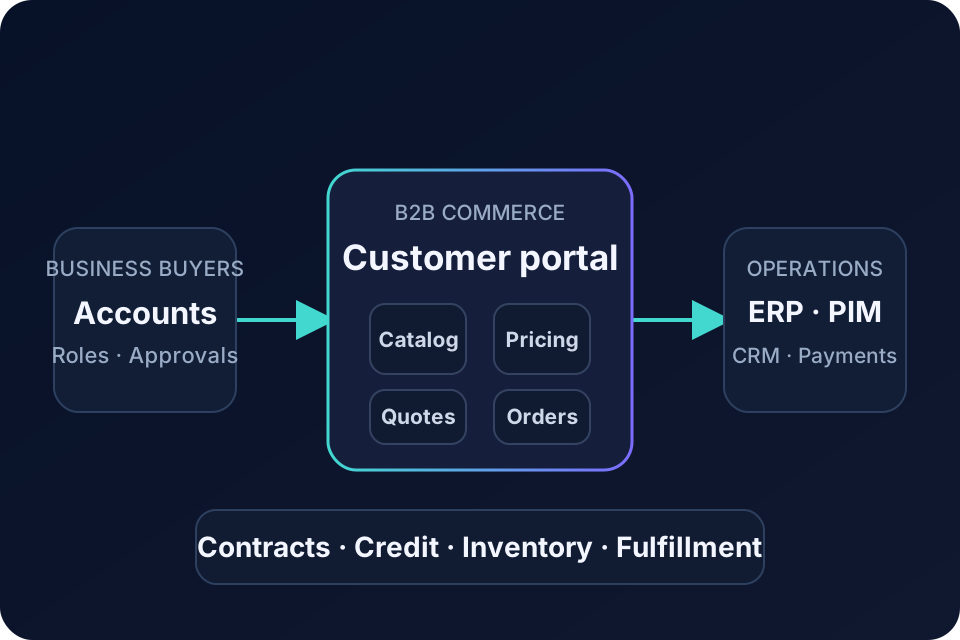
Most B2B portals sit within an established system landscape. ERP commonly owns customer records, terms, invoices, and order fulfillment. PIM may own product content; CRM may own opportunities and account activity; an OMS may coordinate inventory and fulfillment. The systems integration scope describes the separate data ownership and failure-handling work behind that portal.
Define a system of record for each entity and an integration contract for every flow. Specify direction, frequency, validation, failure behavior, retries, reconciliation, and operational ownership.
Do not make checkout wait synchronously for every back-office system. Where business rules allow it, use cached read models, queues, and asynchronous processing to protect customer experience from downstream latency.
Choosing a B2B eCommerce platform
Evaluate platforms against real scenarios rather than feature checklists. Ask whether the solution can represent your account hierarchy, pricing model, quote process, catalog rules, and integration constraints without excessive customization.
Magento and enterprise commerce suites provide established B2B capabilities. Shopify Plus, BigCommerce, and other platforms can fit many wholesale models. A composable or custom approach may be appropriate when the transaction model or system landscape is unusual.
The best platform is the one that supports core workflows clearly and leaves the organization with a maintainable operating model.
UX principles for B2B buyers
B2B users value speed, clarity, and confidence. Show account context, contract price, stock status, units, delivery expectations, and validation errors precisely. Keep dense tables readable and keyboard-friendly. Preserve work when sessions expire or approvals interrupt the journey.
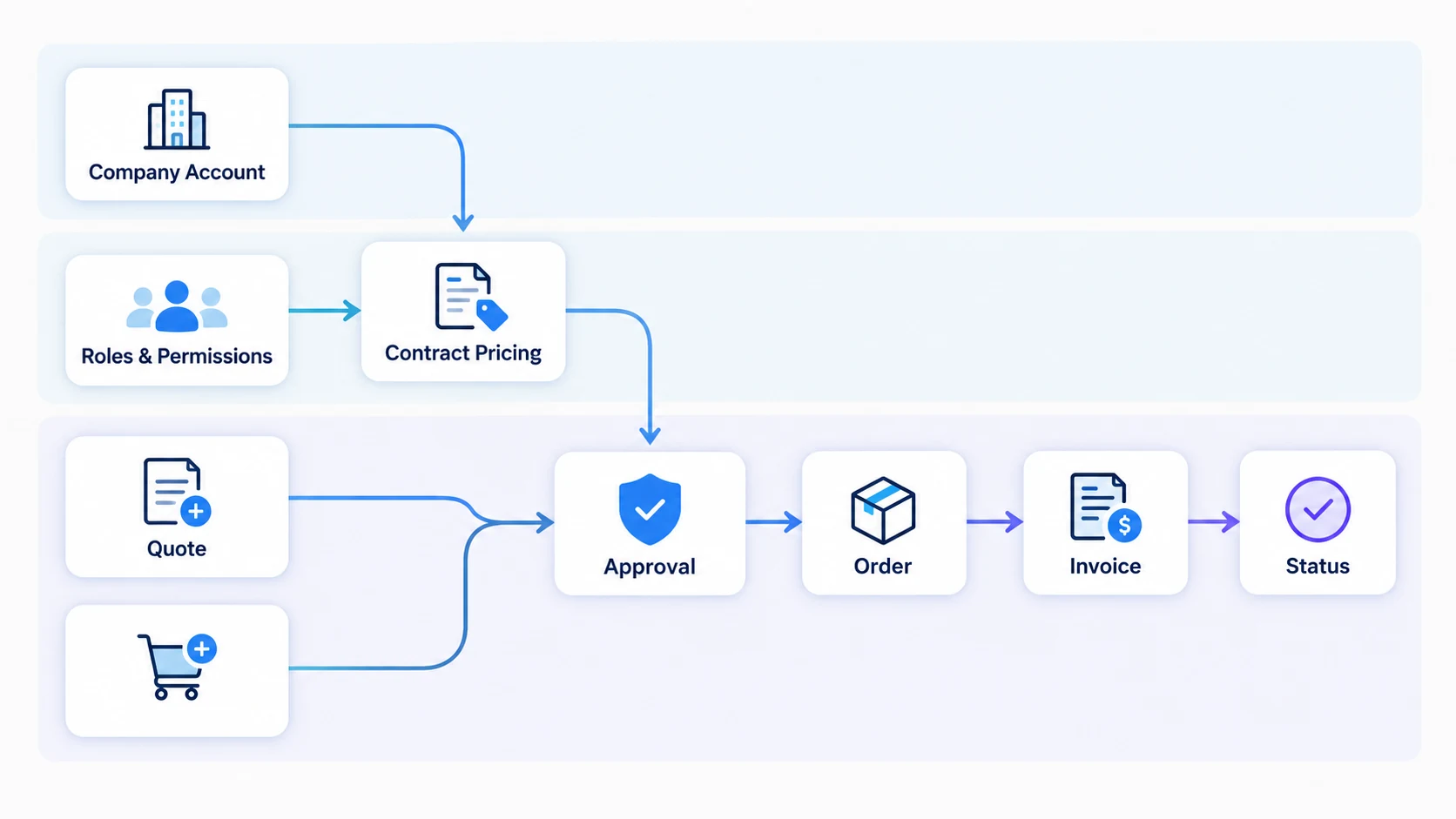
Responsive design still matters: buyers may review, approve, or reorder on mobile even when complex purchasing begins on desktop. Accessibility is equally important for forms, tables, dialogs, and status messages.
Security and governance
Company accounts create authorization risks. Enforce permissions on the server, not only in the interface. Protect documents, invoices, negotiated prices, and personal data. Support audit trails for approvals, account changes, quotes, and orders.
Use least-privilege integration credentials, rotate secrets, monitor unusual behavior, and define how former employees lose access. Security responsibilities should be clear across the platform vendor, development team, and internal IT.
A practical delivery process
- Map current sales and purchasing workflows, including exceptions.
- Prioritize customer journeys and operational outcomes.
- Define entities, ownership, and integration contracts.
- Validate complex workflows with prototypes.
- Select the platform and architecture against documented scenarios.
- Deliver complete vertical journeys in increments.
- Test permissions, pricing, inventory, failures, and load.
- Pilot with representative customers before broad rollout.
Measure adoption, digital order share, order-entry effort, error rates, quote cycle time, repeat-order speed, and support demand. Revenue alone may not show operational value.
Choosing a B2B development partner
Look for experience in commerce, integration architecture, data modeling, security, and operational support. Ask the team to demonstrate how it handles account-specific rules and downstream failures—not merely how it themes a storefront.
Flexor offers B2B eCommerce development for account-specific commerce and connected operations. Review all eCommerce development services and learn about the company when evaluating a delivery partner.
How B2B commerce differs from D2C
| Capability | D2C commerce | B2B commerce |
|---|---|---|
| Customer model | Individual account | Organization, buyers, roles |
| Pricing | Public or segmented | Contract and account-specific |
| Ordering | Immediate checkout | Quotes, approvals, purchase orders |
| Fulfillment | Consumer delivery | Locations, schedules, partial supply |
| Integration depth | Moderate | Often ERP- and CRM-led |
Frequently asked questions
What is B2B eCommerce development?
B2B eCommerce development is the design and implementation of digital purchasing systems for transactions between businesses, including company accounts, negotiated pricing, approvals, credit, quotes, integrations, and repeat-order workflows.
Does a B2B portal need an ERP integration?
Not always, but most established B2B operations benefit from it. The ERP often owns customer terms, inventory, orders, invoices, and fulfillment data that the portal must use reliably.
Can one platform support both B2B and B2C?
Yes, if it can separate catalogs, prices, permissions, checkout rules, and experiences cleanly. Shared infrastructure should not force either audience into unsuitable workflows.
How should a B2B portal be launched?
Pilot it with representative customers and sales staff. Validate real catalogs, account rules, orders, integrations, and support processes before expanding access.
Which B2B rules belong outside the ERP?
Customer-facing presentation, session experience, search, and orchestration may sit outside, while authoritative contracts, credit, and financial records often remain in ERP or CRM.
How should B2B checkout handle ERP downtime?
Use explicit availability rules, cached data where safe, asynchronous order acceptance when appropriate, visible status, retry controls, and reconciliation.